Related documentation
Metadata Fields
Every content file in Roe — posts, pages, products, documentation — opens with a block of YAML called frontmatter. This is the metadata for that piece of content.
Frontmatter sits between two --- lines at the top of the file:
---
title: The first post
subtitle: Before all the other posts
date: 2024-05-22
status: published
post_type: article
---
When editing in the admin, the Metadata panel reads and writes this YAML for you. You can also edit it directly in the file.
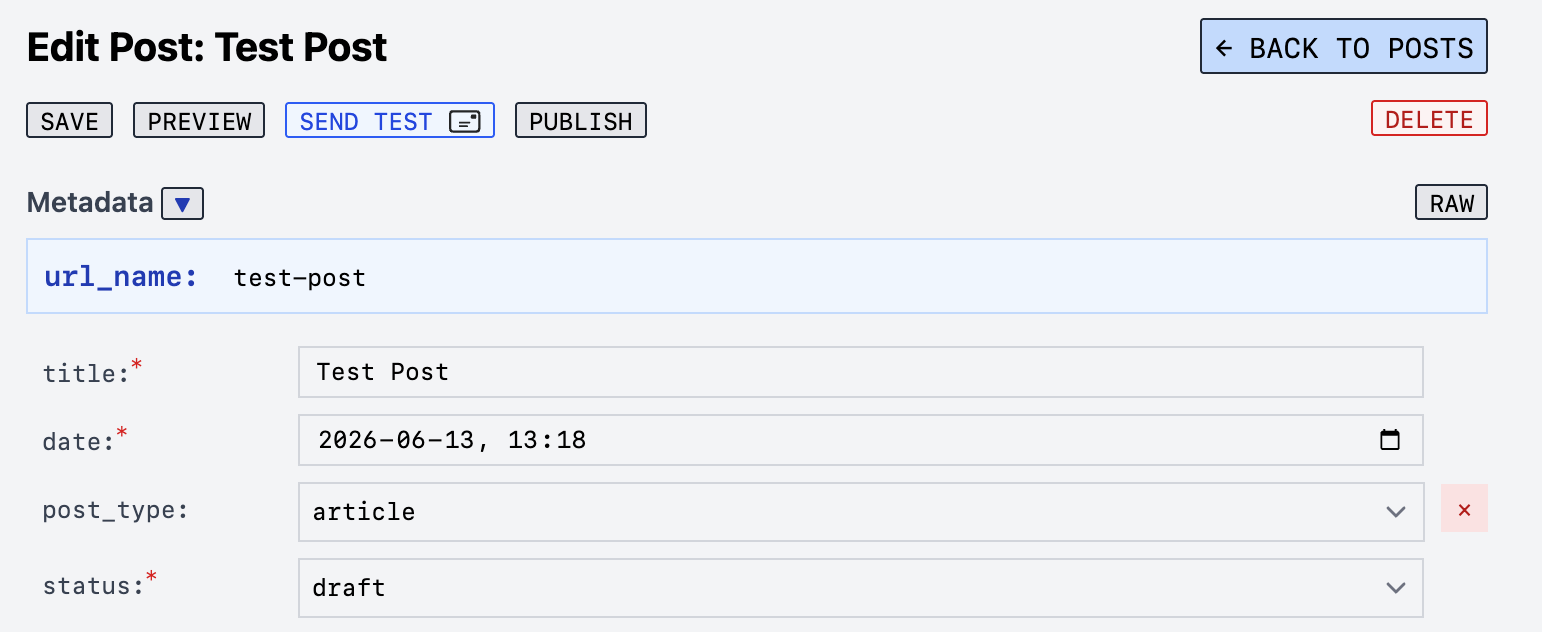
Fields show up in the editor automatically based on post_type, whether members or newsletters are enabled, and other context. The + Add Field button lets you add any field manually.
Shared Fields
These fields work across posts, pages, and products.
| Field | Values | Description |
|---|---|---|
title |
Any text | The title of the content. Required. |
subtitle |
Any text | A secondary heading or short description. |
url_name |
my-slug |
Custom URL slug. Auto-generated from title if not set. |
status |
draft published unlisted
|
Controls visibility. Defaults to draft if not set. |
excerpt |
Any text | Short summary. Used in collections, SEO, and social sharing. |
image |
/media/images/... |
Featured image path. Used in collections, social sharing, and post headers. |
tags |
[tag-one, tag-two] |
Tags for filtering collections. Use a YAML list. |
Status Values
| Value | Behavior |
|---|---|
draft |
Not visible to the public. Default when status is missing. |
published |
Visible to all (or to members, depending on audience). |
unlisted |
Accessible via direct URL but not listed in collections or feeds. Not indexed by search engines. |
Posts
Posts are dated content — blog articles, podcast episodes, audio, and video. In addition to the shared fields above, posts have:
| Field | Values | Description |
|---|---|---|
date |
YYYY-MM-DD |
Publish date. Controls sort order in collections and feeds. Required for published posts. |
post_type |
article podcast audio video
|
Controls the post layout and which extra fields appear. Defaults to article. |
author |
Any text | Post author. Defaults to the site-wide author if not set. |
Audience (when Members is enabled)
| Field | Values | Description |
|---|---|---|
audience |
everyone paid
|
Who can read this post. everyone is the default. paid restricts to paid members only. |
Distribution (when Newsletters is enabled)
| Field | Values | Description |
|---|---|---|
published_to |
site newsletter both
|
Where to publish. site is the default. Use both to publish to the site and send as a newsletter. |
Post Types
The post_type field unlocks additional metadata fields in the editor. These are the available types:
article (default)
A standard blog post. No additional fields beyond the shared and post fields above.
audio
An article with a featured audio player. Adds:
| Field | Required | Description |
|---|---|---|
audio |
Yes | Path to the audio file (e.g., /media/audio/my-song.mp3). |
duration |
No | Duration string (e.g., 12:34). |
video
An article with a featured video player. Adds:
| Field | Required | Description |
|---|---|---|
video |
Yes | Path to the video file (e.g., /media/video/my-talk.mp4). |
duration |
No | Duration string (e.g., 45:00). |
podcast
A podcast episode with RSS feed support. Adds:
| Field | Required | Description |
|---|---|---|
audio |
Yes* | Path to the audio file. *Required for RSS feed; optional if video is set. |
video |
No | Path to a video version of the episode. |
duration |
Yes | Duration string (e.g., 00:42:15). Required for the RSS feed. |
podcast |
No | Which podcast feed this episode belongs to. Set to a podcast key from your podcast config. |
episode_number |
No | Episode number (e.g., 12). |
season |
No | Season number (e.g., 2). |
episode_type |
No |
full trailer bonus. Defaults to full. |
explicit |
No |
true or false. Marks the episode as explicit in the RSS feed. |
subtitle |
No | Short episode description for the RSS feed. |
image |
No | Episode-specific artwork. Falls back to the podcast’s cover art. |
captions |
No | Path to a captions or transcript file. |
guid |
— | Unique episode identifier. Set automatically — do not edit. Changing it breaks existing subscribers’ players. |
Note: The guid field is managed by Roe automatically when a podcast episode is published. It is intentionally locked to prevent it from changing, since podcast apps use it to track which episodes a listener has already downloaded.
Pages
Pages use the shared fields. The only page-specific behavior is:
| Field | Values | Description |
|---|---|---|
url_name |
home 404 or any slug |
home makes the page your homepage. 404 makes it your not-found page. |
audience |
everyone paid
|
When Members is enabled, restricts the page to paid members. |
podcast |
a podcast key | Connects the page to a podcast show: renders the show’s name as the page heading and its subscribe section. (Distinct from the post podcast field above, which assigns an episode to a feed.) |
Products
Products require a few additional fields for the store to work:
| Field | Required | Description |
|---|---|---|
sku |
Yes | Unique product identifier. Used by Snipcart for checkout. Never change after purchase. |
price |
Yes | Price as a number (e.g., 19.99). |
category |
Yes | Product category. Must match a category defined in your store config. |
image |
Yes | Product image path. |
description |
No | Short description shown in product grids. |
group |
No | Groups variants together (e.g., same book in different formats). Use the same value on all variants. |
variant |
No | Label for this variant (e.g., Paperback, Digital). |
primary |
true false
|
When grouping variants, marks which one shows first in collections. |
See Products for a full guide to creating and grouping products.
Documentation
Documentation files (like this one) use the shared fields plus:
| Field | Values | Description |
|---|---|---|
tags |
[tag-one, tag-two] |
Tags for filtering documentation collections. |
related |
[url-name, url-name] |
List of related doc url_name values. Used by the related: true collection filter to show bidirectional links. |
link |
Any URL | An external URL. Used by the glossary collection template to make the term title a link. |